An 8 inch tablet keyboard can turn a small tablet from a video-and-reading screen into a useful travel computer. The catch is that compact tablets leave very little room for a comfortable keyboard, so the first attractive option is not always the right one. Before buying, think about where you will type, how often you will carry the setup, and whether your tablet actually supports the connection you want.
Buy for how you live, not for how it looks on the spec sheet. A tiny keyboard can be excellent for short emails, calendar updates, grocery lists, and quick notes. It becomes frustrating when you expect it to replace a full laptop for long documents or spreadsheet work.
What to look for in an 8 inch tablet keyboard
Start with compatibility. Some keyboards connect through Bluetooth, while others use a tablet-specific case with pogo pins or a physical connector. Bluetooth is usually the most flexible choice because it works with Android tablets, iPads, phones, and sometimes Windows devices. A connector-based case can wake the tablet or draw power without separate charging, but it may fit only one model or one generation.
Check the tablet’s operating system before ordering. Android tablets generally support standard Bluetooth keyboards, but shortcut behavior can differ between Samsung Galaxy Tab models, Lenovo tablets, and Amazon Fire devices. iPadOS also supports Bluetooth keyboards, although some compact iPads use different keyboard shortcuts from a Mac. Confirm the exact model number, not just the screen size. An 8-inch tablet and an 8.7-inch tablet can have completely different dimensions and port locations.
The key layout matters more than the product photos suggest. Look for a right Shift key, a usable spacebar, and dedicated backspace and enter keys. Some ultra-compact boards shrink these controls until typing feels like operating a remote control. A keyboard around 8 to 10 inches wide will usually be easier to use than a palm-sized board, even if it takes more room in your bag.

Bluetooth, wired, or keyboard case?
For most people, Bluetooth is the sensible starting point. A basic Logitech K380-style compact keyboard is easier to type on than many miniature tablet covers, and it can often switch between two or three devices. Models from Logitech, Arteck, and Microsoft commonly offer familiar layouts, though exact features vary by model. Expect to spend roughly $25 to $60 for a reliable compact Bluetooth keyboard, with premium options costing more.
A wired USB-C keyboard can be a good low-cost choice for a desk or hotel room. It does not need its own battery and avoids Bluetooth pairing problems. You will need a USB-C adapter if the keyboard uses USB-A, and the cable reduces the setup’s flexibility. Wired models also use the tablet’s port, so charging while typing may require a hub that supports power pass-through.
A keyboard case looks clean and travels well. That convenience comes with tradeoffs. Cases add thickness, can make a small tablet feel oddly heavy, and often use cramped keys. They also become obsolete when you replace the tablet with a slightly different model. An 8 inch tablet keyboard in a separate case may be worth it if you type in short bursts and value an all-in-one package. For serious writing, a separate keyboard with a small stand usually feels better.
The real typing experience
Compact keyboards are not automatically bad. They simply reward realistic expectations. I can use one comfortably for a five-minute message, a packing list, or a quick work note. After about 20 or 30 minutes, the narrow layout tends to create more errors, especially around punctuation, numbers, and the right side of the keyboard.
Key travel also matters. Very flat keys save space, but they provide less physical feedback. A slightly thicker keyboard with scissor switches often feels more controlled than a paper-thin board. Mechanical keyboards can be fun, but they are usually too bulky and loud for a small tablet travel kit. If you work in a quiet coffee shop, a low-profile scissor keyboard is the more considerate choice.
Pay attention to the stand, too. The tablet should sit at a stable angle without sliding backward when you tap near the top of the screen. Some cases support only one viewing angle, which can be awkward on a plane tray or kitchen counter. A separate folding stand lets you adjust the screen and use the keyboard at a more comfortable distance.
Battery life, pairing, and daily annoyances
A useful 8 inch tablet keyboard should reduce friction, not introduce another device that needs constant attention. Look for USB-C charging when possible. Micro-USB still works, but it adds another cable to a bag that probably already contains enough cables. A rechargeable keyboard may last several weeks between charges, while models using two AAA batteries can run for months and are easy to revive during travel.
Pairing should take less than a minute. Keyboards with a dedicated power switch and a visible connection button are easier to manage than models that hide both functions underneath. Multi-device switching is helpful if you move between a tablet and phone, but do not pay extra for it if you only use one screen.
Sleep mode can create a small but annoying delay. Some keyboards disconnect aggressively to preserve battery, then miss the first few keystrokes after waking. Read user feedback for comments about dropped connections, delayed typing, and keys that stop responding. Those details tell you more about ownership than a claim about long battery life.
Which setup fits your routine?
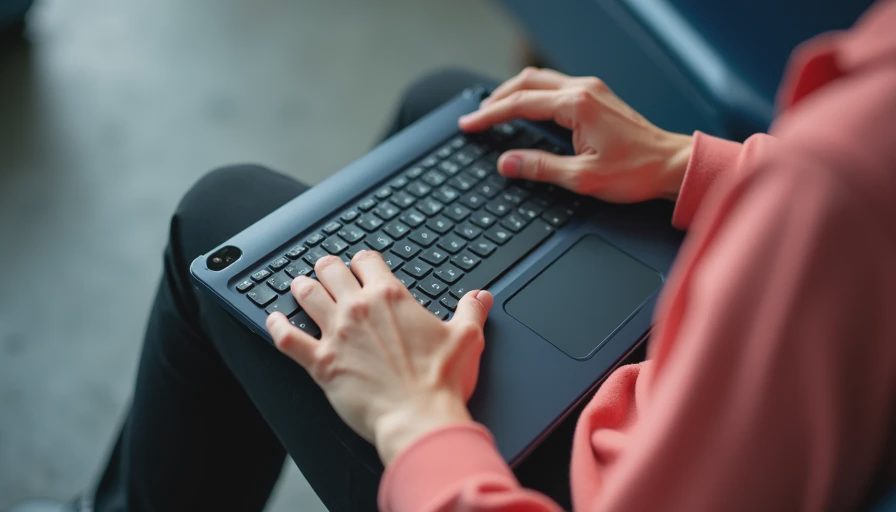
For commuting, choose a separate Bluetooth keyboard, a slim stand, and a small pouch. This combination is flexible and usually weighs less than a thick folio case. It works well for responding to messages on a train, writing notes during a meeting, or reviewing a document at a library table.
For travel, prioritize battery life and durability. A keyboard that fits beside a charger in a personal bag is more useful than a beautiful model that stays at home because it is awkward to pack. If you fly frequently, choose a board with a solid power switch and avoid a layout so narrow that you need to stare at every key.
For a child or casual household tablet, a basic case keyboard can make sense. The protection and built-in stand may matter more than typing comfort. For work, however, spend a little more on a full-width compact keyboard and a stable stand. The extra few ounces are usually worth the reduced frustration.
A simple buying checklist
Before ordering, check the tablet model, connection type, keyboard width, charging port, and return policy. Then look at the actual layout image rather than relying on the phrase compact keyboard. Make sure the product includes the operating-system shortcuts you need, especially if you plan to use copy, paste, screenshot, or app-switching commands.
Budget around $30 to $50 for a dependable everyday setup, then add the cost of a stand if the keyboard does not include one. Spending $100 or more can be justified for better materials, multi-device switching, or a high-quality case, but price alone does not make cramped keys comfortable. If your routine never stresses a premium feature, do not pay for it.
The right 8 inch tablet keyboard is the one that matches your typing sessions, bag, and patience level. For quick tasks, a small Bluetooth board can be a surprisingly effective upgrade. For long writing, a larger tablet or laptop is the smarter answer. Choose the tool that removes friction from your day instead of buying a tiny keyboard because it looks neat in a product photo.