
For a long time, I blamed my afternoon desk fatigue on the usual suspects: not enough sleep, too much coffee, too many tabs open, or just the natural dip that hits around 2 p.m. I tried adjusting my schedule, drinking more water, and taking short walks. None of those changes made a lasting difference because the real problem was sitting in front of me the whole time—my keyboard was too high, my screen was too low, and my wrists and shoulders were paying for it.
The fix was not a new chair or a standing desk. It was a simple combination of a laptop stand and a keyboard with a slight negative tilt. That pairing changed how my arms, shoulders, and neck felt by the middle of the day. It cost less than a single dinner out, and it did more for my work comfort than any expensive ergonomic chair I had tested before.
The Midday Slump Was Not About Energy
By early afternoon, I felt tired, but not sleepy. My shoulders were tight. My wrists felt stiff. My neck ached from looking down at the screen. I assumed I was just getting older or working too hard. But the feeling was consistent, and it disappeared on weekends when I was not at my desk. That pattern told me something about the desk itself was wrong.
The problem was not how long I sat. It was how I sat. A desk setup that feels fine for thirty minutes can become painful after three hours. The fatigue builds gradually, so I did not notice it until the afternoon. By then, the damage was already done for the day.
What I Was Doing Wrong
The Screen Was Too Low
My laptop sat directly on the desk, which meant the top of the screen was well below eye level. To see it, I tilted my head down and slightly forward. That position puts extra strain on the neck and upper back. After a few hours, the strain turns into tension, and the tension turns into fatigue.
The Keyboard Was Too High and Too Flat
Laptop keyboards sit at a fixed height and angle. My hands had to reach slightly upward, and my wrists rested on the hard desk edge. That position forces the wrists to bend backward while typing, which strains the forearm muscles and tendons. Over time, that strain travels up into the shoulders.
The Chair Did Not Match the Desk
I had a decent chair, but it was adjusted for a desk that was too low. I raised the chair to help my wrists, but then my feet barely touched the floor. Lowering the chair helped my feet, but made the wrist angle worse. Nothing was aligned because the desk itself was the wrong height for laptop use.
The real solution was not to adjust the chair endlessly. It was to fix the position of the keyboard and screen so my body could settle into a more natural posture.
The Keyboard and Stand Combo That Changed Things
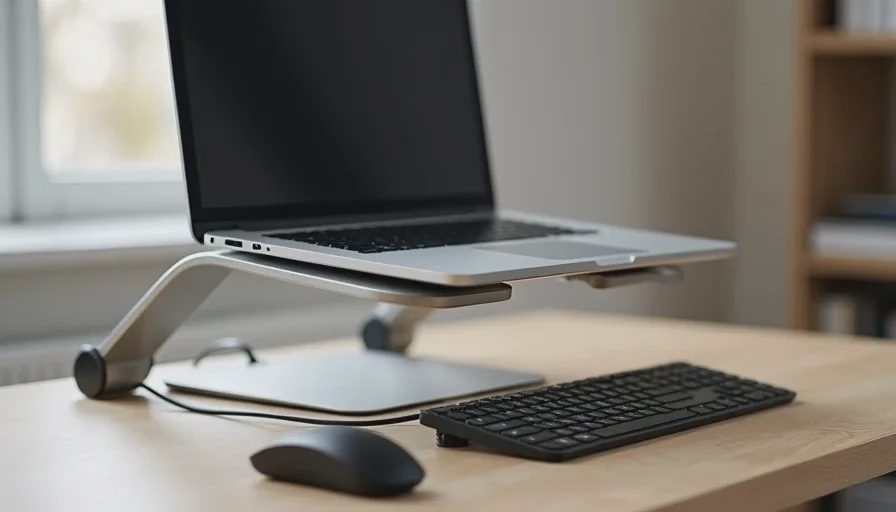
After trying several small changes, I landed on a setup that worked for my body and my small desk. It had two main parts: a laptop stand that raised the screen to eye level, and an external keyboard placed lower and tilted away from me. That combination removed the strain in both directions—no more looking down, and no more reaching up to type.
Raising the Screen First
The first change was raising the laptop screen. I used a simple aluminum stand that lifted the laptop about six inches. The screen was then closer to eye level, and I could sit up without bending my neck forward. This one change made a noticeable difference within the first day.
A laptop stand does not need to be expensive. A basic folding aluminum stand works well. The key is adjusting it so the top of the screen is roughly level with your eyes, or slightly below. You want to look straight ahead, not down.
Adjusting the Keyboard Angle and Position
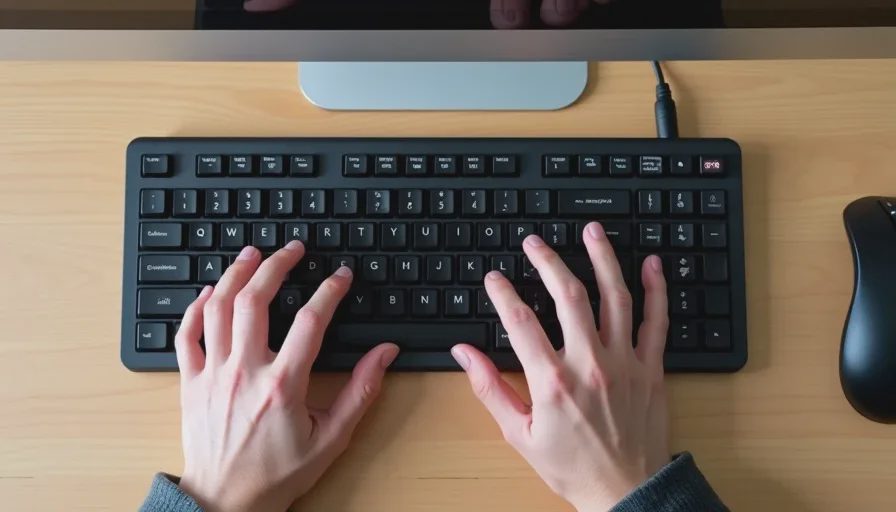
With the laptop raised, the built-in keyboard was no longer usable. I added a compact external keyboard and placed it directly on the desk. Then I experimented with the tilt. A slight negative tilt—raising the front edge slightly or keeping it flat—felt better than the typical positive tilt that pushes the back up.
The goal was to keep my wrists straight, not bent upward. I also moved the keyboard close enough that my elbows could stay near my sides with my forearms roughly parallel to the floor. That single adjustment removed the wrist pressure I had been fighting for months.
Why the Combination Matters More Than Either Alone
A laptop stand alone solves the screen problem but creates a keyboard problem because you cannot use the built-in keyboard. An external keyboard alone does not fix the screen height, so you still look down. Only when the two changes happen together do they reinforce each other.
The stand brings the screen up. The external keyboard brings your hands down and forward. Your neck straightens, your shoulders relax, and your wrists stay neutral. That is the combination that stopped my afternoon slump.
The effect was not dramatic at first. It felt like a small improvement. But over several days, the tightness in my upper back faded. By the end of the first week, I stopped noticing the clock at 2 p.m. because I was not waiting for the day to end.
A Practical Setup for Small Desks
You do not need a large desk or an expensive standing desk to make this work. Here is the setup that worked for me on a desk only 48 inches wide:
A compact aluminum laptop stand with adjustable height.
A tenkeyless external keyboard, placed flat or with a slight negative tilt.
An external mouse placed next to the keyboard, not up on the laptop stand.
A small cable management clip to keep the external keyboard cable from drifting.
The total cost was under $100. If you already have an external keyboard, the cost is even lower. The setup takes up no more space than the laptop itself, and it is easy to move if you work in different rooms.
What I Would Do Differently
If I were starting over, I would skip the first cheap keyboard I bought. It was too wide, and the positive tilt made my wrists feel worse. I replaced it within a week. The lesson is that the keyboard does not need to be expensive, but it does need to fit your hand size and desk space. A compact model with a simple flat profile works better than a full-size keyboard with a built-in wrist rest that forces a specific angle.
I would also measure the desk height before buying a stand. Some laptop stands raise the screen too high, which then forces you to look up. The goal is eye level, not above it. A stand with adjustable height gives you room to find the right position.
Common Mistakes That Make Desk Fatigue Worse
Adding a Wrist Rest Before Fixing the Height
A wrist rest can help, but it does not fix a keyboard that is too high. If you add a rest to an already elevated keyboard, you are just shifting the pressure. Fix the keyboard height and tilt first, then consider a rest if the desk edge still bothers you.
Using the Laptop Keyboard With a Stand
Some people raise the laptop and then keep using the built-in keyboard, reaching up awkwardly. That is worse than the original problem. If you raise the screen, you need an external keyboard. There is no way around it.
Buying an Expensive Ergonomic Chair Instead
A better chair helps, but it cannot fix a screen that is too low or a keyboard that is too high. The chair supports your body, but the desk position determines how your body is positioned in the first place. Start with the keyboard and stand, then adjust the chair to match.
Final Advice: Fix the Position Before the Gear
My midday desk fatigue was not caused by a lack of discipline or motivation. It was caused by a workstation that forced my body into a strained position for hours at a time. The solution was not more willpower or more caffeine. It was a $40 stand and a $50 keyboard.
If you feel worn out by the middle of the day and you work on a laptop, try this before spending money on a new chair or a standing desk. Raise the screen to eye level, place an external keyboard low and flat, and keep the mouse close. Give it a week. You may find that the afternoon slump was never about energy at all—it was about position.